

Knowing how to find keywords for SEO is essential if you want your target audience to discover your product, brand or even your website. A keyword is simply a word or phrase people type into a search engine like Google. If you know which phrases your audience uses, you can create content that matches what they are looking for.
The good news is that you do not need expensive tools to get started. In this guide, you will learn how to find SEO keywords using free Google tools, step by step. By the end, you will have a practical list of keyword ideas ready for review.
1. Start with a Topic
Before you find keyword for SEO, decide what you want to write about. A topic is the subject, product, service, or problem that is relevant to your website and your audience.
Take your time with this step. A clear topic makes every later step easier.
How to Choose Your Topic
- Start with a subject, product, service, or problem your audience cares about.
- Pick a topic that fits the purpose of the content you plan to create.
- Keep it relevant to your website.
Reminder: A topic is only your starting point. It is not necessarily the keyword you will target. Remember topic, not context, or Title of the article, because you will discover and adjust with the actual potential keyword ideas in the next steps.
2. Find Potential Keywords Using Google Trends
Google Trends is a free tool that shows how interest in a search term changes over time. It also shows related search terms, which makes it a helpful place to begin keyword discovery.
This is the first layer of our method. Go to Google Trends, enter your topic, and start exploring.
Set Up Your Google Trends Search
Before you read the results, adjust these three settings so the data fits your needs:
- Location: Choose Worldwide or a specific country that matches your audience.
- Time range: Select a period that suits your goal. A shorter range shows recent interest, while a longer range shows long-term patterns.
- Category: Choose a relevant category if you need to narrow the context of your topic.
Explore the Results
Scroll to the related queries section. Here you will usually find two lists: Top and Rising. Top queries are the most popular related searches, while Rising queries are the ones growing in interest. If this is you first task to find SEO keyword, both top and rising are the same and shown where data is available.
As you review them, keep these points in mind:
- Look for phrases that match your topic and the content you want to create.
- Think about search intent, which is the reason behind a search. In simple terms, what is the person trying to find, learn, or do?
- Write down every relevant keyword idea. You will use them in the next step.
Google Trends is a starting point for discovering search terms and seeing how interest changes. It does not show every possible keyword, so do not worry if your list looks short at this stage.
[SEO Advance] Using Google Trends Keywords Strategically
Yes, you can use keywords from Google Trends as your target keywords. They can be particularly useful for evergreen articles and pages designed to build topical authority. However, broad, popular search terms can be highly competitive, so targeting them may require a stronger SEO strategy. Consider building supporting content around the main topic, strengthening internal links, and developing comprehensive coverage before competing for these keywords.
3. Expand Your Ideas with Google Search
Now take the keyword ideas from Google Trends and look at them one by one in Google Search. This step has two parts: Google Autocomplete (the core layer) and the search results page (the second layer).
Use Google Suggestion Autocomplete
Autocomplete is the list of suggested phrases Google shows while you type. These suggestions reflect what people commonly start typing, so they can reveal more specific variations of your keyword.
Follow these steps:
- Open Google.com.
- Type one keyword into the search box, but do not press Enter.
- Look at the suggested phrases that appear below the box.
- Review the suggestions for useful variations and more specific search queries.
- Write down the ones that fit your content.
- Repeat for each promising keyword from Google Trends.
This is a quick way to find phrases that did not show up in your Trends research.
Explore the Search Results Page (Optional)
If you want to dig deeper into a keyword, type the phrase and press Enter. The page you see next is called the SERP, short for Search Engine Results Page. It shows what Google displays after someone searches.
Look through the page for extra ideas in these areas:
- People Also Ask: A box of related questions. These show what searchers may want to understand about your topic.
- People also search for: A list of related search terms that Google displays, where available.
- Search result titles and descriptions: Read how existing pages describe the topic and what they offer to searchers.
We recommend these areas above use as a sources of ideas only, and DO NOT directly use them as keywords. When you use those keyword will cover it on other articles.
Treat the Google Trends and Google Search suggestion as the core and first layer, this is where you dig it your potential keyword. And other features such as People Ask For and People Also Search For as the secondary layer. Use them as a source of ideas only or to find new angles. For example, when a phrase catches your eye, you can go back on the previous steps: on the Google Search box (or maybe Google Trends), change the word, or swap, explore and check the suggestion and results again.
Reminder: Not every search shows every feature. Availability and presentation can change from one search to another, so check a few different keywords.
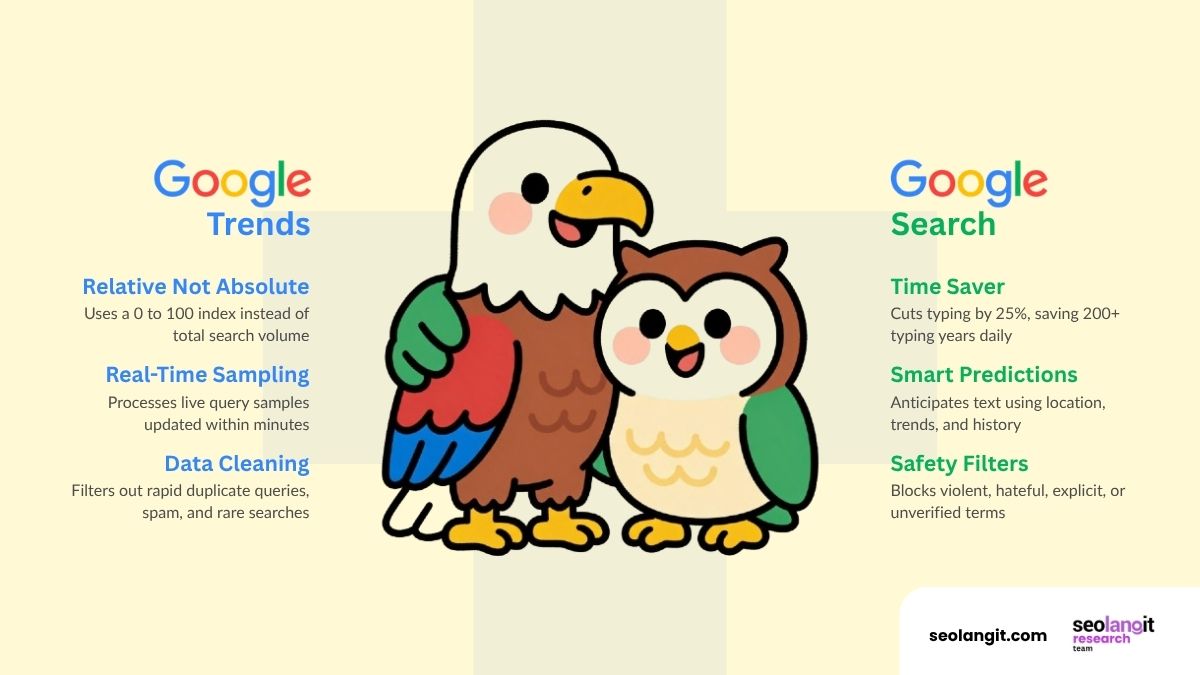
FASCINATING FACTS: Google Trends tracks search popularity on a 0–100 relative scale using filtered, real-time query samples, while Google Autocomplete uses location, trends, and safety filters to predict your text and cut typing time by 25%
Autocomplete vs. the Results Page
The difference is simple. Autocomplete shows what people begin typing. The results page shows what Google presents after they search. Autocomplete gives you keywords to collect. The results page gives you ideas to explore.
“Want to understand why Google suggests these phrases? Read our article on how Google keywords work to learn more about how Google connects searches with relevant content..”
4. Make a List of Potential Keywords (Work With AI)
By now, you have collected ideas from the core layer: Google Trends and Google Search suggestions. It is time to put them in one place.
A simple spreadsheet is enough. Keep the two sources apart, as if you were working in one Excel or Google spreadsheet file with two sheets.
Set Up Your Keyword File
For example
- Sheet 1: Google Trends. List the potential keywords you found in Google Trends.
- Sheet 2: Google Search Suggestions. List the phrases you found through Google Autocomplete.
Reminder: Although Our method will not recommend to add phrases from People Also Ask or People also search for as keywords, but you can keep them and add another Sheet for another purposes.
Work with AI to Fill In the Details
Typing the keywords is the easy part. For the extra columns, you can let AI do the first draft. Paste your keywords into an AI tool and ask it to fill in these columns:
- Group: Puts similar keywords together, so you can see which ones describe the same idea.
- Search Intent: The reason behind the search. It is informational (wants to learn), commercial (comparing options), transactional (ready to act or buy), or navigational (looking for a specific site or page).
- Or Other Column, such as topics, the broader subject the keyword belongs to.
Here is a simple example using the topic from earlier. You will get your own results will depend on what you find in Google.
Example Sheet 1: Google Trends – how to find keyword for SEO
| Keyword | Group | Search Intent | Topic |
| keyword A | group A | intent A | topic A |
| keyword B | group B | intent B | topic B |
| keyword C | group C | intent C | topic C |
| keyword D | group D | intent D | topic D |
Reminder: AI gives you a fast first draft, but can make mistake. You know your website best, review each column and correct anything that looks off, especially search intent.
These extra columns also help you evaluate keyword ideas and plan your content more effectively. Group and Search Intent help you match keywords with the right content, while Topics reveal opportunities to build topical authority. Your keyword list also helps you decide which keywords need separate articles, study competing pages, identify content gaps, and plan internal links. Grouping similar keywords also helps you avoid content overlap, where multiple articles target the same search intent.
At this stage, focus on building a practical list of potential keywords. You do not need to select your final target keyword yet. The goal is to gather and organize enough useful ideas to make more informed decisions in the next steps of your keyword research.
5. Review Your Potential Keyword Ideas Before Moving Forward
Before you go any further, take a moment to review your list. This quick check helps you keep the ideas that make sense and set aside the rest.
Ask yourself these four questions about each keyword:
- Relevance: Does the keyword match your topic and the purpose of your content?
- Search intent: Will your planned content give searchers what they are likely looking for?
- Content suitability: Can you cover the subject well on the page you have in mind?
- Topic overlap: Do several phrases describe essentially the same search need? If so, you may only need one of them for the same page. Your Group and Topic columns make this easier to spot.
Keep the phrases that fit your website and your audience.
Reminder: This is an initial keyword review. It is not a complete evaluation of search volume, competition, ranking difficulty, or business potential.
The Principles Behind SEOLANGIT’s When finding SEO keyword
SEOLANGIT has more than 10 years of SEO experience and also GEO: AI Optimization services. Our keyword research method follows four simple principles that explain how we find and evaluate potential keywords.
Start with Two Layers
Our method uses two layers. The core layer consists of Google Trends and Google Search Autocomplete, where we collect potential keywords. The second layer includes People Also Ask, People also search for, and other search results features, which provide additional ideas and new angles. Treat these extra ideas as inspiration, then adjust the phrases and check them again using the core sources.
Think of Keywords as Demand
A keyword represents what someone wants to find, understand, or solve. Instead of collecting phrases just to use in your content, ask yourself what the searcher actually needs. Understanding that demand helps you create more relevant and useful content.
Use Specialized Keyword Tools Later
You do not need paid keyword research tools or bulk keyword generators to build your first list. Start with what Google provides to understand search demand and collect potential keywords. Specialized tools can come later when you need to evaluate your list in greater detail.
Apply the Same Thinking Beyond SEO
Keyword research follows the same basic idea across websites and social media: understand what people are looking for, then create content that meets their needs. Each platform has its own search behavior, so you may need to adjust the method accordingly.
Conclusion: Work Around Google Trends and Google Search
Finding keywords for SEO does not have to begin with specialized tools. A few free Google features are enough to get you started.
Here is the process in short:
- Start with a relevant topic. It is your starting point, not your final keyword.
- Explore related search terms in Google Trends. This is the first layer of your research.
- Check promising phrases with Google Search suggestions (Autocomplete). Together with Google Trends, this is the core of your keyword list.
- Use the search results page as the second layer. Take ideas from People Also Ask and People also search for, but do not use them directly as keywords. Tweak or change the phrase, then check it again in Google Search or Google Trends.
- Build your two-sheet list, with Google Trends on Sheet 1 and Google Search suggestions on Sheet 2. Let AI fill in the Group, Search Intent, and Topic columns, then review them yourself.
- Review your list for relevance, search intent, content suitability, and topic overlap.
How to find SEO keywords does not have to begin with specialized tools. By starting with a relevant topic, exploring Google Trends and Search Autocomplete, organizing your findings, and reviewing your ideas, you can build a practical list of potential keywords.
The goal is not to collect as many phrases as possible, but to understand what people are searching for and identify the keyword opportunities worth exploring further.

Leave a Reply